Selling With BoostWare Fulfillment
BoostWare Fulfillment accelerates your selling process, ensuring faster delivery of your products to customers and enhancing their satisfaction with your business.
This guide highlights the key processes involved in using BoostWare Fulfillment for your sales operations.
If you're new to BoostWare Fulfillment, take a look at our New Merchant Guide to help you get started.
Order Status Flowchart
Central to the sales process is managing orders for your products.
Below is a flowchart that illustrates the lifecycle of an order.
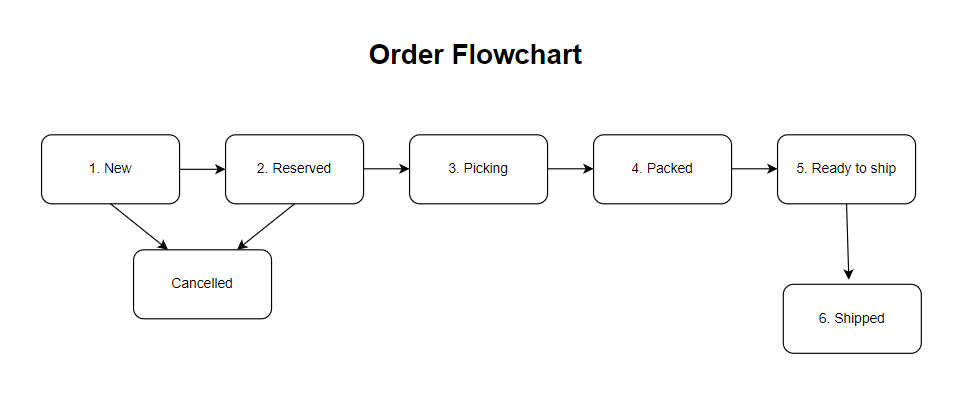
- All orders in BoostWare Fulfillment initially have a "New" status. Orders can be imported manually or synced directly from integrated marketplace platforms.
- When sufficient stock is available for the SKUs, the status changes to "Reserved." This update often happens immediately, so you might not see the "New" status. Cancellations should be done by the "Reserved" stage; after this point, additional steps are required to cancel the order.
- When the warehouse team begins fulfilling the order, its status changes to "Picking."
- Once the order is packed and ready for shipping, the status is updated to "Packed."
- Finally, the status is updated to "Shipped" after the order has been handed over to the 3PL partner for delivery to the customer.
For more information on managing orders, visit the Order Page.
There is also a category known as Pending Orders. Pending Orders allow you to choose whether to process or skip them in BoostWare. For more information, see the Pending Orders Page.
Stock Flowchart
The flowchart below illustrates the various stages that stock undergoes in BoostWare Fulfillment.

- Stock is initially represented by ASN Records, which prepare our staff for the stock's upcoming arrival.
- Upon arrival, stock undergoes an inbound process, where it is counted and checked for defects.
- After clearing the inbound process, the stock is moved into the warehouse for storage.
- When orders are received, the corresponding SKUs are reserved for these orders.
- The reserved stock goes through picking and packing to prepare it for shipment.
- Once packed, the stock waits for pickup by the designated 3PL partner.
- After the 3PL partner picks up the stock, it is considered shipped by BoostWare Fulfillment.
For a detailed breakdown of your stock status, refer to the Reports section, where you can generate various stock reports.
Managing Multiple Merchants
We support individual accounts managing multiple merchants, acknowledging that some businesses oversee various brands across different accounts.
In BoostWare Fulfillment, you’ll find options to filter lists by merchant, allowing for clearer separation of data for each merchant.